Build Your Own Nodes
Overview
Each node in BoCoFlow represents a specific operation or function. It is straightforward to create your own nodes based on your own Python code.
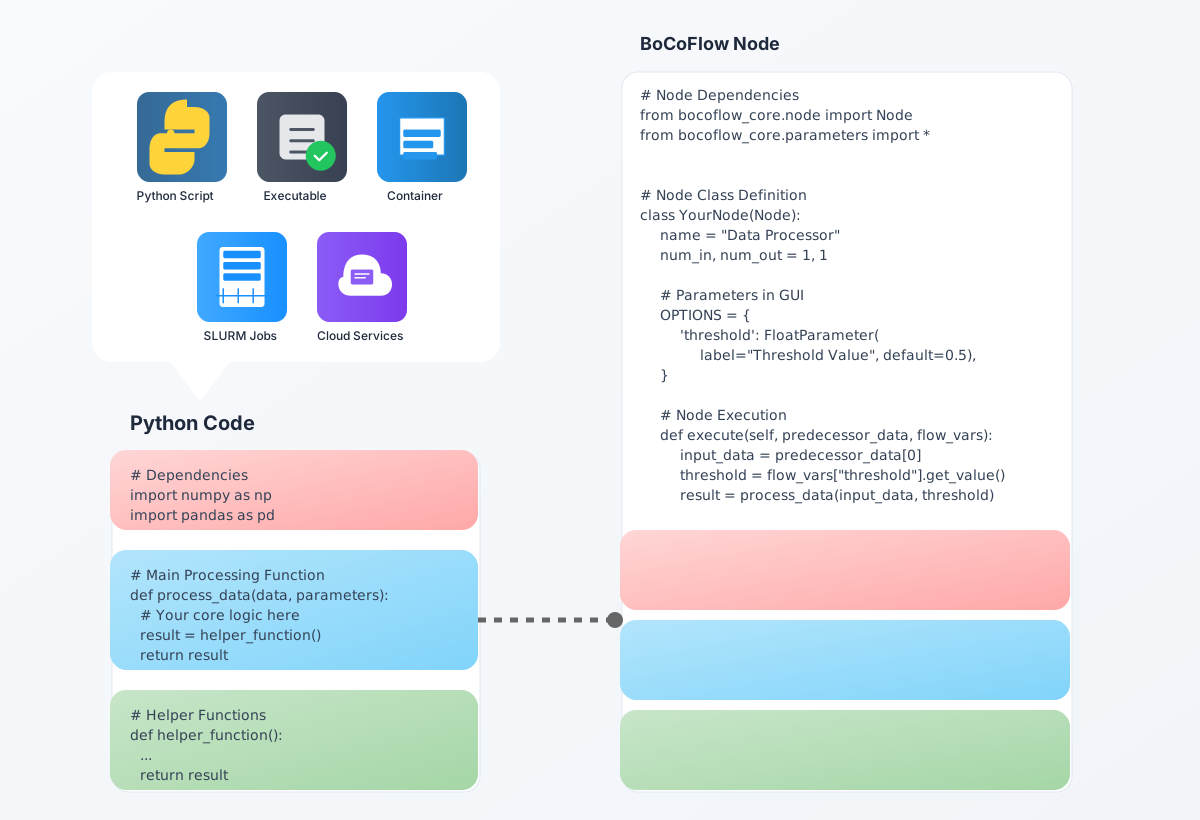
You can always use the nodes in the pdbmdauto-flow project as examples to create your own nodes.
1. Build a start node
Start Node: Such a node will not have any input ports. The code will not examine the input data from the previous node.
This is a simple template node that will ask a user to provide a name as input and will passing a hello world 'name' message to the next node.
copy and paste the following code into a new file named hello_world_node.py
# Import dependencies for the node
from bocoflow_core.node import Node, NodeResult
from bocoflow_core.parameters import StringParameter


class HelloWorldNode(Node):
    """
    A simple hello world node that takes a name as input and outputs a greeting.
    """
    # Display metadata. For a quick standalone file these class attributes work;
    # a packaged node instead declares name/num_in/num_out in its meta.toml.
    name = "Hello World"
    num_in = 0   # input port count (0 = a start node, no upstream input)
    num_out = 1  # output port count

    # Parameters shown in the GUI
    OPTIONS = {
        'user_name': StringParameter(
            "Your Name",
            default="BoCoFlow",
            docstring="Name of the person to greet",
        ),
    }

    def execute(self, predecessor_data, flow_vars):
        """
        Process the input data and produce output.

        Args:
            predecessor_data: results from upstream nodes (empty for a start node)
            flow_vars: dict of parameter name -> Parameter (use .get_value())

        Returns:
            str: JSON from NodeResult.to_json()
        """
        name = flow_vars["user_name"].get_value()

        # Package the output in a NodeResult — this is the contract the runtime
        # expects (not a bare json.dumps). Whatever you put in result.data is what
        # downstream nodes read from their predecessor_data.
        result = NodeResult()
        result.data = {"greeting": f"Hello, {name}!"}
        result.success = True
        result.message = f"Greeted {name}"
        return result.to_json()
For anything beyond a quick example, scaffold a proper package (a meta.toml +
node.py, plus an optional pure-Python core.py) rather than a single file — see
the node package structure in the developer docs. Splitting the science into
core.py keeps it unit-testable without the BoCoFlow runtime.
I am demonstrating how to use such a start node in BoCoFlow in the following video: